Monday, April 6, 2015

KRISTEN THE SCIENCE GIRL!!!

Kristen The Science Girl- On Solar Energy!!! 
Congratulations to Kristen on this video being selected as a Finalist in the Fast Forward Film Festival on environmental perspectives- She made this for EARTH SCIENCE!!!
Diamonds were not only valued for their decorative value, but were also used as a talisman

Friday, September 12, 2014

Top 6 Instructional Technology for teachers to start using this week- By a teacher #2

Welcome back!!!  In this second installment as a teacher you may be looking for a way to share content with your students that you do not have time for in class, or you know there are students needing that extra push to complete the work or those that finish early and need something to explore while you support others to finish.

2. YouTube Playlists: Again this is Google based- once signed into Google you also have a FREE YouTube account as part of your Google account, Google purchased YouTube in 2006 for $1.65 billion.  For example I teach Sciences.  I have playlists created for different topics throughout the year that serve as introduction in class if we carve out time, or as ways to get students engaged in content beyond the classroom.  Today's learners are looking for connections with learning and to experience content rather than passively absorb to later spit it out in multiple choice format.  As an educator, you may not have the tech background at this point to create videos on YouTube, but you have the power to ignite student interest in learning.  Why not just let the students choose what they watch?  You know they will end up on cat videos, or anything that YouTube recommends.  When you create playlists- you are filtering the content for them, helping to direct their time, students are likely engaging with technology outside of school, give them direction and help yourself at the same time by being a part of their experience online.

TRY IT: Now go try it out- Search on YouTube for any topic you want to share with students, choose a video to watch and at the bottom of the video window is a clickable button which reads "Add to" click on this and you will be able to create and name a "New Playlist".  Once you have a playlist created, each time you click "Add to" the names of your created playlists will be selectable- choose which to add it to.
SHARING-To share your playlists with students: Most students will know how to get to your content by sharing your YouTube username.

Wednesday, September 10, 2014

Top 6 Instructional Technology for teachers to start using this week- By a teacher

Are you ready to challenge students (and yourself) to engage in learning supported by technology?  Are you ready to save time, wear and tear on your body from carrying pounds of papers and a computer back and forth to home and school? Do you feel that you are behind the students to a point where it is getting to be too far behind?
We are adults so we will always appear to be behind- but I want to share my experience and technology use in real classrooms and within my entire grade 6-12 school to give you the first steps into tech and teach.  This will not take months or years to learn and implement- it will take minutes to get started and your level of use/expertise will come with your use and how you desire to use the tech.

I am a 9 year Science teacher in NY and I have researched technology and tried it in the classroom- so that you can use it in yours with ease and minimal invasion into your existing teaching style.

INSTRUCTIONAL TECHNOLOGY FOR THE TEACHER TOP 6 will be posted over time: We begin with the by far most important for teachers to try and breathe a sign of relief.

1. Google Drive- You have millions of files spread out over your school computer, home computer, school network, and online.  Google Drive gives you a FREE- really seriously FREE- personal hard drive in the cloud that can store any file you want in addition to replacing Office.  If you have a Gmail account- you already have a Google Drive- sign in to Google and search for Drive- it will be a top search result. After 6 years of using Google Docs, Google Groups, Google SketchUp, and Google Slides with my students, my school was able to convert to Google for all students and teachers this summer.  In short, Google Drive allows you to upload any file you wish to Google Drive.  If these files are in any Office format from Microsoft, Open Office, and more, you can open and edit the files with Google Docs(Docs replaces Word)
For Excel files use Google Sheets, and PowerPoints can be converted and edited in Google Slides. I used to be ragged on by fellow teachers for not hauling a giant bag back and forth from school to work each day- WHY? I saved files- notes, HW, projects and labs to Drive, edited at home and it is saved in the cloud so I can access the files from anywhere and they are updated and saved with every keystroke.  It will make your life easier and your bag will thank you.  MORE GREAT FEATURES: You can collaborate on Docs, Sheets, Slides and more in real-time with your colleagues and students. You can edit and comment on student work from anywhere without having to download and re-upload every file individually- everything is saved for you automatically and the colleague/student sees the same file you do-automatically.
Sunday, September 7, 2014

Beginning the Tablet Pilot Program for Mercy

This year, we will be exploring the use of various tablet models within the school.  There will be 8 students participating beginning at the end of September.  The entire school is also using Google Apps for education this year, once the log ins are shared, all students and teachers will be able to collaborate via Google Docs, Sheets, Slides, Forms and we will be using further Apps for Forensic Science and Marine Biology as we engage in the units following our Water in Our World unit.  I trained your teachers for part of a conference day the week before school began and will continue to train and support teachers.  If you know of any helpful Google Chrome Apps or Web apps, please share them through the comments box below.  Back to the Pilot: The Pilot will consist of iPad, Android, and Windows tablets, as well as Chromebooks for use in the classroom. We are looking at the possibility of implementing a tablet program for the entire school in 2015-2016, this may be too ambitious as of now, the administration will decide next spring/summer. 

Wednesday, May 14, 2014

Our School is Switching over to Google Education Apps!!!  Below you will find links to Google's Educator certification training modules- students, you can use these also- so you are ready to take full advantage of your Google Account for next year and beyond! 


As we have heard, each of us and all students will be using a Google account beginning next year.
We are all at differing levels of Google use. To support learning about how to use Google, every day I am sending the link to online Google Educator Training you are able to go through at your own pace-only 10-15min per lesson. There are many, many helpful tools available through Google.

Including: 
1.An email account= named gmail, 

2.Share-able calendars, 

3.A personal online hard drive for storage accessible from anywhere(named Google Drive)
to a Free Office suite(Google Docs=Word, Google Sheets=Excel, Google Slides=PowerPoint, Google Forms=SurveyMonkey-all work is saved automatically with each keystroke), 

4.Google Groups for classroom use,

5.Google Classroom(releasing this Fall). 

6.Beyond this, there are thousands of non-Google apps that we can use(Ex: Lucidcharts, 3D drawing programs, and many many more that will save your work into your Google Drive automatically. 

In order to help familiarize everyone with daily use of Google and the practical classroom applications of Google programs, there is an online training program specifically for educators. 

****Learn the Basics and Beyond: http://www.google.com/edu/training/certifications/
This is for all levels of Google use, you can learn from the ground up, or test out if you use Google already.

**To see direct applications of Google in the classroom, explore the training here: http://www.google.com/edu/training/tools/

**Wondering how Google is implemented in schools beyond the online components? Here are a few of the programs Google has created for schools: http://www.google.com/edu/programs/index.html

Saturday, March 29, 2014

Game Based Learning (playlist)

Game Based Learning playlist on YouTube- Introductory videos and how your learning will be even more engaging in the very near future!!!
https://www.youtube.com/watch?v=LNfPdaKYOPI&list=PLSYApO1iPy_wlahUjj2fK9GxODgVR3ccT


Monday, February 3, 2014

Starfish wasting syndrome

I have been hearing about this for a few months and the article and PBS special report video inside the article show how scary this disease is. Starfish are pulled apart by their own legs moving in opposite directions and then crawling away autonomously.  As we approach our study of Marine Biology in Applied Sciences- I wanted to post this as a reminder for us to look more into this when we begin our unit.
The article and video: http://io9.com/an-unbelievably-gruesome-epidemic-is-ravaging-starfish-1513950473/@rtgonzalez

Monday, January 13, 2014

Clue Board 2013

CLUE(R) Board we used for our Forensic Class Study.  We played through one game as an introduction for students unfamiliar with the game. The student task- to create a system  of tracking suggestions and cards shown to determine which cards other teams held in order to solve the case. Students created systems within teams and tracked their own data sets during gameplay. Students took their four games or data, then wrote their system's inner workings and results into a formal laboratory report. Overall=Interest factor by students,  increased 82% (in an informal survey) over the play of the games. 86% of the systems would directly work in solving a Clue(R) game when applied. The students were encouraged to refine their system for future games and further increased accuracy of card knowledge.  We will continue to review new implementation of gamification throughout the unit. 

Monday, October 28, 2013

How will you help Improv help you?

Email from an Improv club Alumna Class of 2013: 

The whole reason I thought I should email you was because of this weekend though. I went on a retreat which was a super great experience, and for one of the activities we had to do we had to talk about a person or event that allowed us to be more confident and out going and the first thing that popped into my head was you and the rest of improv club. Its amazing when I think about how I would act if I hadn't done improv club. It helped and is still helping me be more open when talking to new people and confident when sharing things and speaking in front of classes and talking to teachers. So thanks so much for that... And then also during the retreat we had to preform a little skit and our group leader started off coordinating the skit by asking “So who is good at improv?!” and the girl I sat next to on the bus there jumped out of her seat and pointed at me saying that I did improv club in high school so I would be great at this so of course I got super nervous and panicked but they gave me the kind of central part and when we performed it in front of the large group people actually laughed at my joke which was wonderful and unexpected and I really think improv helped me with the skit and make friends so that was super great. Any way thanks so much for everything you did that made me feel more confident and out going both through improv and just regular conversations etc. 

More than a club, and non-stop laughter.

To the JV Soccer Team-

Mercy Soccer Family,

Thank you all so much for a fantastic season and for having such truly wonderful young women. They make each day happier and more fun than the last. I am honored to coach them and to have fun while doing so is an even greater reward. It is said that close games build champions-I believe this also- we are truly primed for next year and for life! It is in being challenged that players grow not only on the field, but in their own hearts and minds. To be a champion every day takes many forms, some days at Mercy it is on the soccer field, other days it is in service to others, or leading others when it is necessary. Each day on the field, I believe my task is not only strategy and drills, but to instill my players with belief, hope, pride, and resilience. Belief in themselves and those around them, hope that they knowing hard work today translates into success in all areas of their lives, pride in representing something more than the individual, but the same team that the FIFA player of the year represents proudly every day. Finally, resilience- I have never played so many close games in a season as a player or a coach in the combined 54 seasons I have been a part of a soccer team. To not score more than two goals in one game and to not allow more than two goals in a game is more of a lesson in resilience than I could ever teach from the sideline. Now we part ways to travel teams, or other sports, or moving up. Remember this year as the one that taught you about a few things, what that is may be different for all of you, but our team song brings us all back together-One..two..three...We are one body, one body in Christ, and we do not stand alone.

Thank you for the kind gifts, and for getting the players where they needed to be-even when we did have a bus! Thank you Ellen and thank you Wayne for your daily participation and to each and every ounce of food made for dinners! It was all so delicious and the girls enjoyed every bite!

We were truly blessed this year to be (for the most part) healthy, and we were able to avoid concussions in season and any major injuries. I am so proud of those coming back from serious leg and head injuries and those battling daily pain-to work hard every day - without complaint and with great enthusiasm.

PLEASE TURN IN ALL UNIFORM PARTS (JERSEY-BLUE/JERSEY WHITE/SHORTS) to my room M-108.
IMPROV CLUB STARTS THIS THURSDAY in M-108


Thursday, July 25, 2013

ACTIVE Reading System!!!

Hi Everyone!!! The full presentation of the ACTIVE Reading System is here in PDF form. I will follow it up with more of our strategy and practice guides as we continue creating them. If you find good Vary your style reading music, add the songs as a comment and where you found it! Enjoy and KEEP READING!!!!!
The ACTIVE Reading System GO GO GO!!!

Friday, March 30, 2012

PARTY ROCK IS IN THE HOUSE

Here we are again at Rocks and Minerals!  2012 is great so far- a lot of chemical weathering happening due to our warm temps.

Great work on your Mineral Books- several teachers complimented your work!!! Way to go!

We are headed for Easter week and we will be diving into the minerals(hopefully with a low hardness on Moh's scale-hard ones will hurt if we dive into them.-Such as Quartzney)

Idenifying minerals is our next lab and one the best of the year!

Tuesday, May 24, 2011

GM Hydrogen Fuel Cell Car Presentation

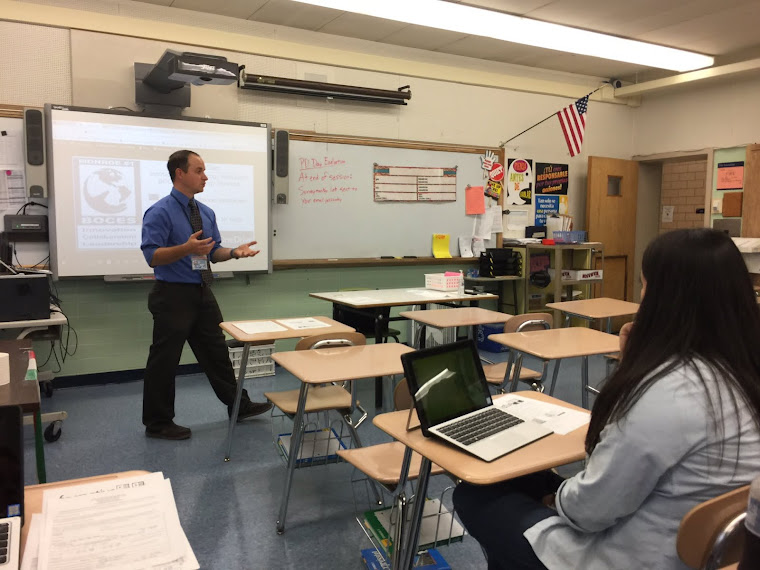
My cousin- Mr. Smith from the Honeoye Falls GM research facility came in to speak to the Applied Science, AP Chem and Earth Science- morning classes yesterday, here are some pictures. Awesome job.